Widget SDK
Description
Widget SDKs include libraries, tools, and samples to make it easier for Partner to start integration with Cabital widget.
Get Started
In order to use Cabital Mobile SDK you should:
- Do some backend preparations
- Choose the platform:
- Native SDKs
- Frameworks Plugins
Backend Routines
In order to embed our Mobile SDK you have to complete a couple of preparation steps on your backend and use the results to pass into the Mobile SDK initialization:
-
Widget URL: Get a Widget URL that is associated with the
partnerId- an identifier for your platform, and with theuser_ext_ref- a user identifier in your system.The link should contain the above required parameters!
No matter which features you’d like to go, for further more details on widget features and related parameters can check here.
-
Initialize SDK: Now you can initialize the Mobile SDK with the target widget URL.
Native SDKs
Frameworks Plugins (In Progress)
- Flutter plugin
- React Native module
iOS SDK
Requirements
- iOS 9.0 or later
- Xcode 13+
Integration
-
Download the latest version of the SDK and unzip it.
Swift Sample
- Widget framework: CabitalWidget.xcframework
- Version: 0.9
- Release date: 2022/08/13
- MD5: b3b482e87d9f2cf7fe34a160041db8c4
- SDK: Download
-
Copy the SDK dynamic library file CabitalWidget.xcframework to the your project directory.
-
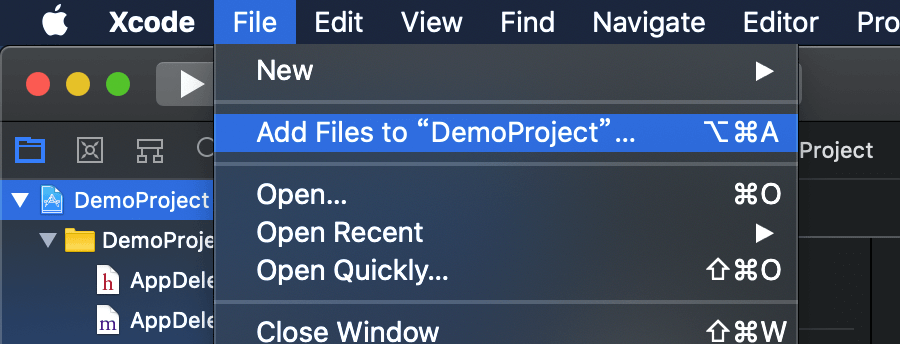
Select the File > Add Files to {project_name} menu to add the SDK library files to your project in Xcode.
-
Set Embed & Sign
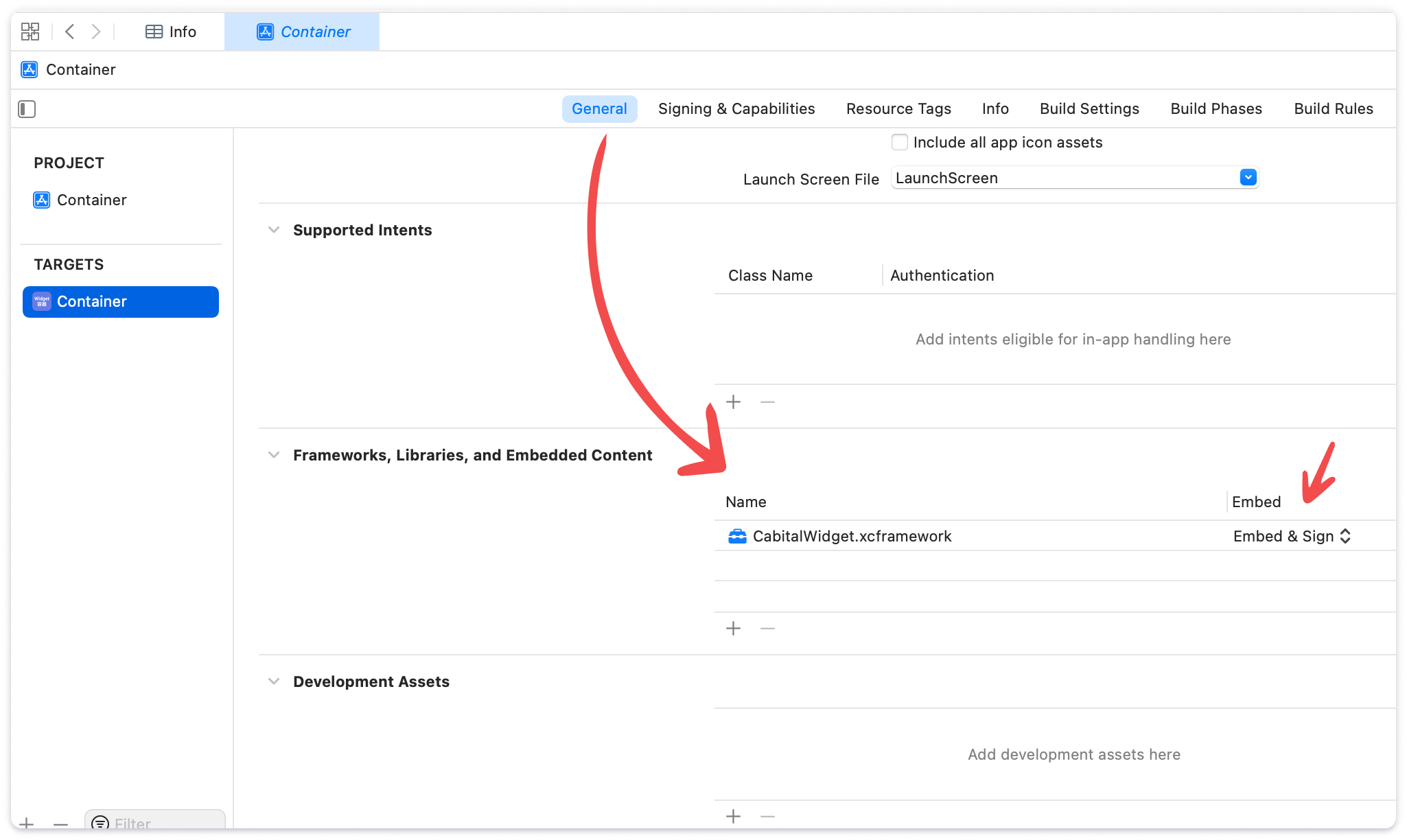
- Find the TARGETS > General > Frameworks, Libraries, and Embedded Content section
- Click the + button to add CabitalWidget.xcframework
- Set Embed to Embed & Sign
Set Permissions
Cabital's component require camera's permission to scan ID document and selfies during the KYC process.
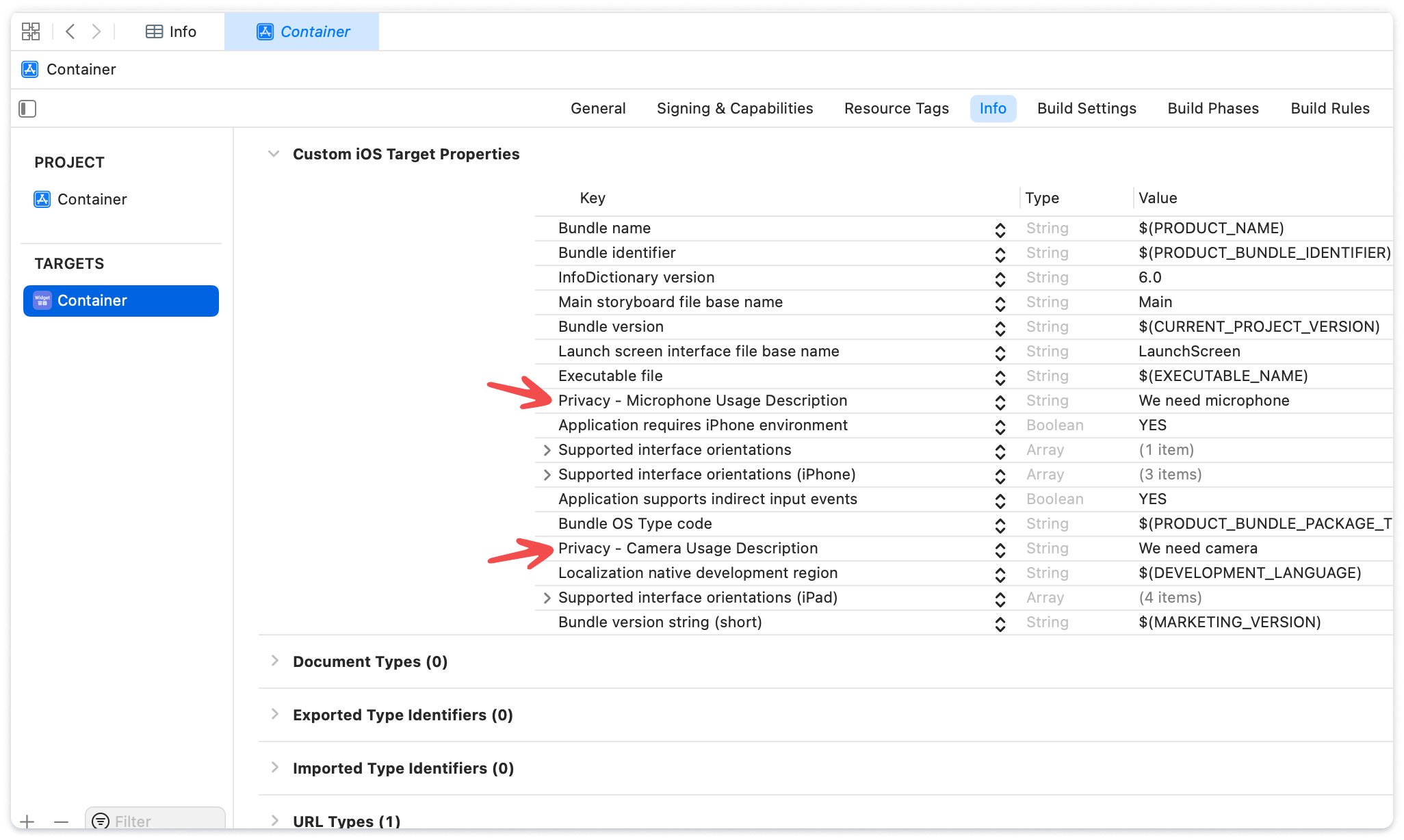
- Find the TARGETS > Info > Custom iOS Target Properties section.
- Click the + button to add camera and microphone permissions.
- Privacy - Camera Usage Description
- Privacy - Microphone Usage Description
Swift Sample
Android SDK
Requirements
- AndroidX
- API level 21 (Android 5.0) and above
- Kotlin 1.5 or higher
For minSdkVersion not higher than 21, you may see the warning below!
    Manifest merger failed : uses-sdk:minSdkVersion 19 cannot be smaller than version 21 declared in library [widget-release.aar] /Users/xxxxxx/.gradle/caches/transforms-3/98a238675acc4cfa298c45ddad66ddb4/transformed/widget-release/AndroidManifest.xml as the library might be using APIs not available in 19

    Suggestion: use a compatible library with a minSdk of at most 19, or increase this project's minSdk version to at least 21, or use tools:overrideLibrary="com.cabital.widget" to force usage (may lead to runtime failures)
Sample
- Add library dependency to build.xml
-
Add AAR file to your project
-
Permission setting
- Initialization