Connect Account
Before connecting an account, customers should login to their Cabital account or register a new Cabital account to start the onboarding process.
For new Cabital customers, we will guide them to complete the KYC process and set up 2FA after the account is linked, so partners do not need to design any flow to do this.
Which feature is more suitable for us?
- For
APIbased solution, we recommended to usefeature=onboarding, customers can easily return to the partner platform by clicking the button after completing onboarding. - For
Widgetbased solution, we recommended to usefeature=linkto guide customer go to wallet page after completing whole onboarding process.
Link
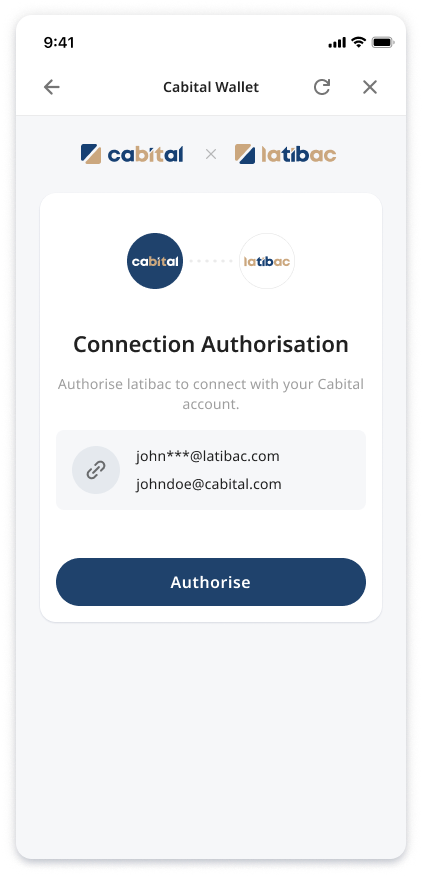
After customers has successfully linked accounts, the widget will guide them to the next page according to their account status.
When they passed Cabital KYC, they can enter the Wallet page directly.
URL Parameters
| Parameter | Required | Description |
|---|---|---|
feature |
Yes | link |
email |
Yes | Customer account ID provided by Partner. 1. Only for display purpose 2. Can mask part of the information 3. e.g. john***@latibac.com |
redirect_url |
No | Customers will be automatically redirected to the partner site immediately after account linked. 1. Need to encode the URL before encrypting. 2. If no value is given, the customers' account status will determine which page they will be redirected to. |
Onboarding
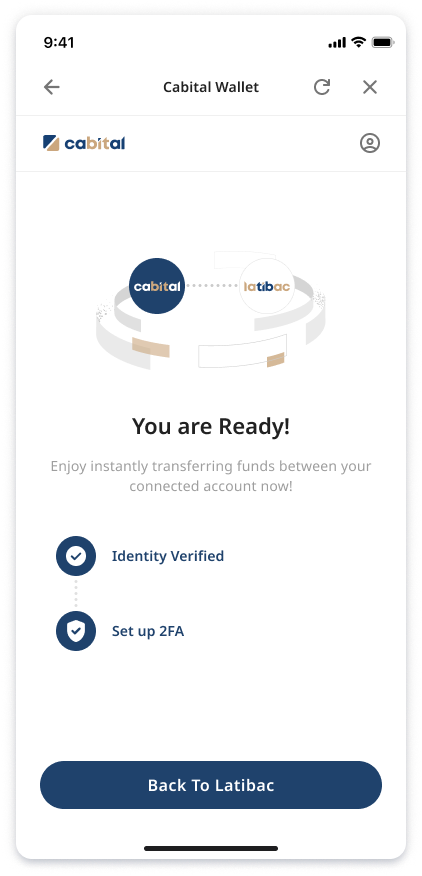
Customers need to complete the account linked, KYC and 2FA setup, then click the button below to go back to the partner's platform (as shown on the right).
URL Parameters
| Parameter | Required | Description |
|---|---|---|
feature |
Yes | onboarding |
email |
Yes | Customer account ID provided by Partner. 1. Only for display purpose 2. Can mask part of the information 3. e.g. john***@latibac.com |
redirect_url |
No | After completing the Cabital onboarding process, customers can click the button below to go to the URL. 1. Need to encode the URL before encrypting. 2. If no value is given, the customers' account status will determine which page they will be redirected to. |